 Copy Line
The Copy function makes a full copy of the line active in editing. In this case, the line number also remains the same. Parameters define how new line will be created. Select the line you want to copy. Mouse right click --> Snap to object needs to activated. See below.
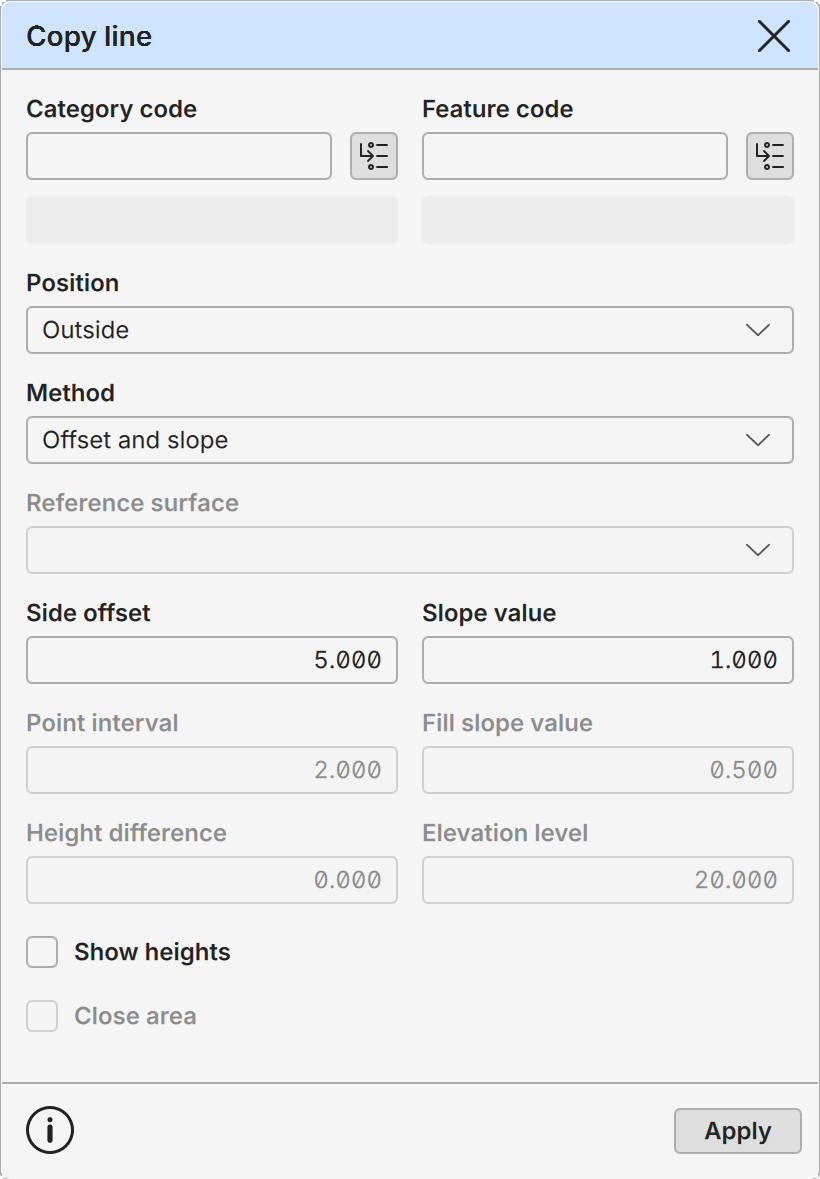
Category Code, Feature Code
Shows currently assigned Category and Feature codes of the selected line. They can be changed before creating copies.
Buttons beside the fields activate code in the code list. If the code list is not currently visible, it is opened or activated automatically.
Read-only fields below the code fields display code descriptions from the loaded code lists.
Position
New line position in relation to the original line.
Left: Creates a new line on the left side of the original line.
Right: Creates a new line on the right side of the original line.
Both: Creates new lines on the both sides of the original line.
Inside: Creates a new line in the inside of the original closed line. The direction of the original line does not matter.
Outside: Creates a new line on the outside of the original closed line. The direction of the original line does not matter.
Method
Copying method. Changing this activates appropriate parameter fields below.
Offset and slope Copy line using the side offset and slope.
Offset and height difference Copy line using the side offset and height difference.
Offset and elevation level Copy line using the side offset and given elevation level.
Slope and height difference Copy line using the slope and height difference.
Slope and elevation level Copy line using the slope until the given elevation level is reached.
Slope and surface Copy line using the slope until the given reference surface is reached. Note that there are two different slope values with this mode: cut slope and fill slope. Former is used when the line is below surface and latter when the line is above surface.
Reference Surface
Surface model for Slope and surface copying method. The selection list contains all surface models in the element list.
Side Offset
Horizontal side offset from the original line.
Slope Value
Slope from the original line. A negative slope value is downward. When used with the Slope and surface copying mode, it contains cut slope used when the surface model is above of the original line.
With Slope and surface method this becomes Cut slope value and is used when the reference surface is above the original line. Sign has no meaning in this case.
Point Interval
Point interval for the Slope and surface method. All original line segments longer than this value are divided to smaller parts. Smaller value gives more accurate surface intersection line.
Fill Slope Value
Fill slope used with Slope and surface method when the reference surface is below the original line. Sign has no meaning here.
Height Difference
Height difference from the original line. A negative height difference is downward.
Height Level
Constant height level for the new line.
Show Heights
Shows point height values for both original line and preview copies.
Close Area
Creates single combined area from copied lines. Is available only when copying to the both sides.
Apply
Creates new lines to the active file.