 Properties
Displays the active object properties.
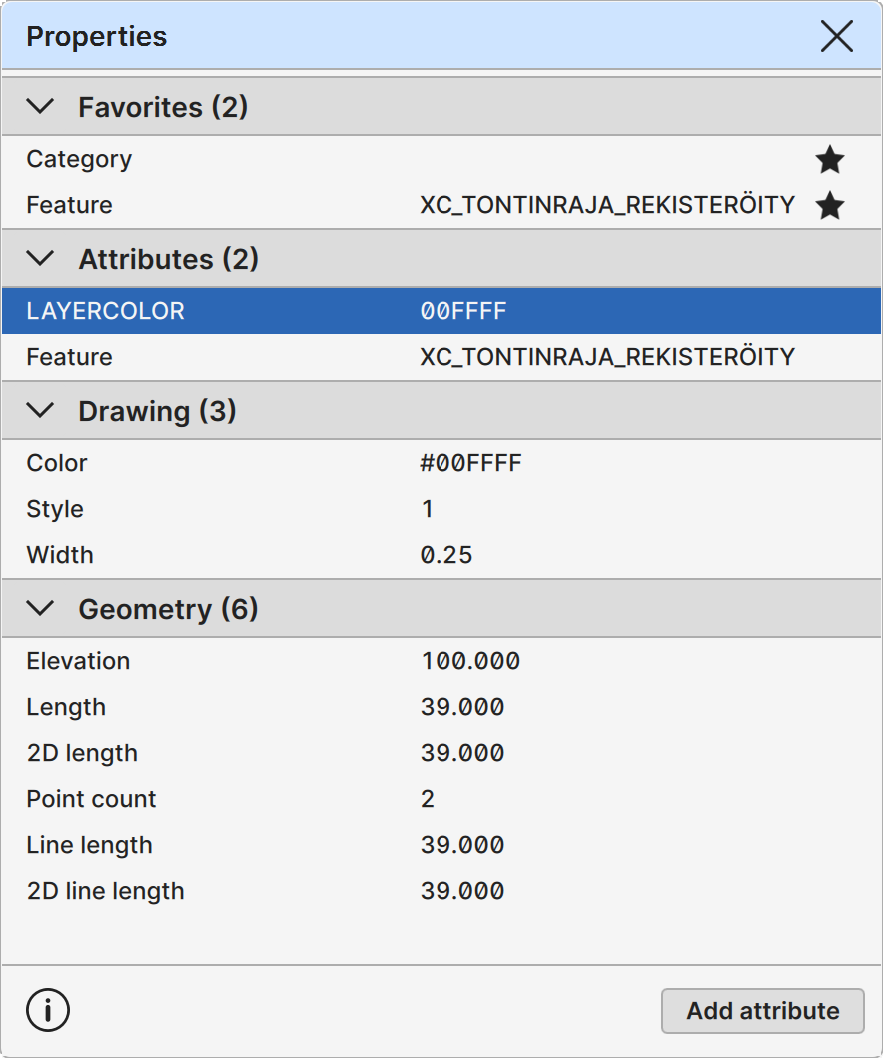
Left column displays the property name and right column contains the property value. Clicking the pin icon at the right edge pins or unpins a property to the topmost section. Title bar arrow icons can be used to open or close the section. The button at the bottom, Add attribute, can be used to create a new attribute with given name and value.
Any property's name and value column can be double-clicked to access the value through read-only text field. User may use basic text editor commands such as Ctrl+C to copy the selected contents. Predefined properties show their internal tag value (e.g. Elevation -> #Z) when the name is selected. User-defined attributes are generally editable. Some system-defined properties are also editable, and a smaller subset of these properties can also be deleted. To add a system defined property that does not exist on the object using a macros defined in Find tool documentation (e.g. use #LINEID to generate a "Line id" attribute).
There are four separate property categories:
- Favorites: Currently important properties pinned by the user.
- Attributes: Active object attribute data.
- Drawing: Active object visualization data.
- Geometry: Active object geometric data.
Most names in the Attribute category are just their ID tags. Some specific attributes have their own names:
- Category: Category code - editable value.
- Feature: Feature code - editable value.
- Point id: Point id - editable value and deletable.
- Line id: Line id - editable value and deletable.
- Comment: Object comment.
- Text: Text string.
If the active object has some drawing information, they are displayed in the Drawing category:
- Color: Object RGB color value.
- Style: Point symbol or line style.
- Width: Line width.
- Size: Point symbol size.
Geometry category displays the following geometric properties for objects:
- Elevation: Active single or line point Z-coordinate.
- Length: Active line segment 3D length.
- 2D Length: Active line segment 2D length.
- Radius: Arc or circle radius.
- Point count: Amount of points in the active line.
- Line length: 3D length of the active line or area border.
- 2D line length: 2D length of the active line or area border.
- 2D area: 2D area of closed line or area.
User-defined Attributes
User-defined attributes can be added to the Attribute category. Pinned properties may be used to access and modify the value field of the property found in the active object. User-defined attributes may be deleted and if it was pinned to the Favorites category, the deleted attribute name is kept.
Pop-up Menu
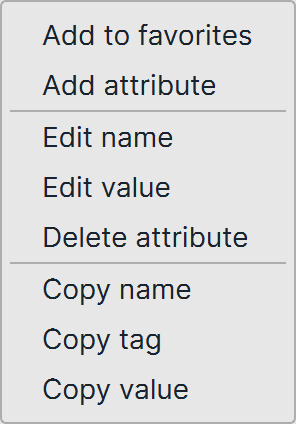
Secondary mouse button opens pop-up menu with additional functionality. Available commands depend on the current tree item type and application state like the active object or the active file.
-
Add to favorites Adds the current item to the favorites category at the top.
-
Remove from favorites Removes the current item from the favorites category at the top.
-
Add attribute Adds a new attribute to the Attribute category. Keyboard shortcut Ctrl+Enter performs the same operation.
-
Edit name Starts edit on the name field. Keyboard shortcut Shift+Enter performs the same operation on the current item.
-
Edit value Starts edit on the value field. Keyboard shortcut Enter performs the same operation on the current item.
-
Delete attribute Deletes the current item from the Attribute category. Keyboard shortcut Delete performs the same operation on the current item.
-
Copy name Copies the property's external name value to clipboard.
-
Copy tag Copies the property's internal tag value to clipboard.
-
Copy value Copies the property's value.