 Add Circle
Circle adding mode for adding circles to the active file. First mouse clicks defines the circle center point. Second mouse click calculates the circle radius from the center point and adds new circle to the active file.
Circle toolbox remembers the previously used radius and initializes it automatically after the center point mouse click. It is possible to add multiple circles with the same radius by just clicking the center point and pressing the Enter key.
Circle is considered to be a line and it receives automatically previously used line category and feature codes.
Floating toolbox
After the first mouse click, small floating toolbox appears beside the mouse cursor. It displays the current radius value and has keyboard focus during the operation. New radius value can be entered by using the keyboard. Pressing the Enter key accepts the value and stores the circle.
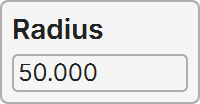
Tab-key hides and shows the toolbox.